
Introducing Slink#
Early this year I built a tool for calling XRPC APIs. “XRPC” is what they call APIs described by Lexicon, the JSON-based API description mechanism that powers Bluesky and the AT Protocol. Lexicon is in the same genre as Protocol Buffers and OpenAPI, but it’s simpler and more constrained. That’s nice! It makes it easier to write Lexicon-based clients and code generators. You can read more in the XRPC spec.
To a certain extent, my slink tool wrote itself. It is a Go CLI, and its subcommands include code generators that produce Go client libraries and CLIs for arbitrary Lexicon API descriptions. These generators wrote the parts of slink that call XRPC APIs. I didn’t start with such a broad ambition – at first I was just wanting to replace the more-or-less official Go client libraries for Bluesky. These are in the bluesky-social/indigo repository and are created with lexgen. But once I had done that, I started writing a CLI to exercise my generated clients, and quickly realized that this, too, could be automatically generated.
The result is on GitHub.
Owning the whole project gave me the opportunity to add one more feature that I’ve always wanted in OpenAPI and Protobuf-based code generators: my generator optionally takes a simple JSON file called a “manifest” that lists just the APIs that I want to call. Then it generates exactly and only the code that I need. No generated code bloat! The result is the lightest-weight Go calling experience for XRPC short of handwriting your clients yourself.
Here’s the manifest for a Go program that sends Bluesky chat messages:
{
  "ids": [
	"com.atproto.server.createSession",
	"chat.bsky.convo.getConvoForMembers",
	"chat.bsky.convo.sendMessage"
  ]
}
What’s wrong with lexgen?#
If Go client libraries already exist, why do this?
If you just want a tl;dr it’s this: lexgen was created by and for infrastructure developers who are working in the bluesky-social/indigo monorepo. It’s great for them, but if you’re just writing a light HTTP-based ATProto client, it’s got complexity that can kill your project before it gets started.
lexgen is not really documented#
If you want to learn lexgen, you have to start with the source, and then go up to the indigo Makefile to see how lexgen is used. Why does this matter? If you only need to call the Bluesky APIs, it doesn’t, but if you’re using new lexicons that don’t have published clients, you need something to generate your structs and API-calling code.
lexgen configuration is confusing and unnecessary#
Down in the lexgen sources, there’s a JSON file that lexgen uses to manage its mapping from Lexicons to Go packages. It’s here and is small enough to quote:
[
  {
    "package": "bsky",
    "prefix": "app.bsky",
    "outdir": "api/bsky",
    "import": "github.com/bluesky-social/indigo/api/bsky"
  },
  {
    "package": "atproto",
    "prefix": "com.atproto",
    "outdir": "api/atproto",
    "import": "github.com/bluesky-social/indigo/api/atproto"
  },
  {
    "package": "chat",
    "prefix": "chat.bsky",
    "outdir": "api/chat",
    "import": "github.com/bluesky-social/indigo/api/chat"
  },
  {
    "package": "ozone",
    "prefix": "tools.ozone",
    "outdir": "api/ozone",
    "import": "github.com/bluesky-social/indigo/api/ozone"
  }
]
What’s going on here? This is mapping well-structured hierarchical Lexicon name fragments (the prefix fields) to Go packages (the package fields) and specifying storage and import locations for generated packages. This configuration is only necessary because lexgen has a complicated mapping of Lexicons to packages. The Go package names don’t match the Lexicon prefixes and because generated code is put into multiple packages, the generator has to know what import paths to use to resolve cross-package dependencies. So you might ask “why are there multiple packages?” That’s one of the tools that we use to manage large amounts of code, and we have so much code because lexgen is generating code for everything so that it can be statically published in a repo. I think there’s a better way, demonstrated below with slink.
lexgen is messily entangled with CBOR#
When I first started using lexgen, I tripped on a pretty terrible circular dependency.
The code that lexgen generated included tags that configure CBOR code generation. The CBOR code generator depended on this, so it would only work if that code could be compiled. But that code included references to CBOR generated code, so it wouldn’t compile until the CBOR generator had run! What (or why) the ever-loving F? This has been raised in a GitHub issue that has been open for over a year. What’s wrong here? CBOR. The maddening thing for XRPC application developers is that most of them never use CBOR or even need to know anything about it. This is a clear instance of the cart (infrastructure developers) pulling the horse (app developers) in the indigo repo, but it’s not the only one.
lexgen’s client libraries are in the indigo repo#
The more-or-less official (my words) Go XRPC client libraries are in the indigo repo. This is a big repo. It’s effectively a monorepo for Bluesky’s Go infrastructure work and as a result, it has an enormous list of dependencies. If you’re writing a little TODO-list ATProto app, that is the last thing that you want to see.
The generated code itself doesn’t have all these dependencies. Here’s an example that sends a chat message:
// Code generated by cmd/lexgen (see Makefile's lexgen); DO NOT EDIT.

// Lexicon schema: chat.bsky.convo.sendMessage

package chat

import (
	"context"

	lexutil "github.com/bluesky-social/indigo/lex/util"
)

// ConvoSendMessage_Input is the input argument to a chat.bsky.convo.sendMessage call.
type ConvoSendMessage_Input struct {
	ConvoId string                  `json:"convoId" cborgen:"convoId"`
	Message *ConvoDefs_MessageInput `json:"message" cborgen:"message"`
}

// ConvoSendMessage calls the XRPC method "chat.bsky.convo.sendMessage".
func ConvoSendMessage(ctx context.Context, c lexutil.LexClient, input *ConvoSendMessage_Input) (*ConvoDefs_MessageView, error) {
	var out ConvoDefs_MessageView
	if err := c.LexDo(ctx, lexutil.Procedure, "application/json", "chat.bsky.convo.sendMessage", nil, input, &out); err != nil {
		return nil, err
	}

	return &out, nil
}
The problem is that to use this code, your project has to include indigo as a dependency, and every time there’s an update to anything in that repo, indigo gets a version bump and you get a Dependabot alert for something that’s very probably irrelevant, but you have no way to know that without manually checking the indigo repo, so you’ll probably just make the update and litter your commit history with meaningless revisions.
lexgen uses a clumsy representation for unions#
This isn’t the biggest flaw in lexgen, but it’s disappointing to find that unions are represented in its generated code by big structs with fields for every possible union type value. Here’s an example from api/bsky/actordefs.go.
type ActorDefs_Preferences_Elem struct {
	ActorDefs_AdultContentPref            *ActorDefs_AdultContentPref
	ActorDefs_ContentLabelPref            *ActorDefs_ContentLabelPref
	ActorDefs_SavedFeedsPref              *ActorDefs_SavedFeedsPref
	ActorDefs_SavedFeedsPrefV2            *ActorDefs_SavedFeedsPrefV2
	ActorDefs_PersonalDetailsPref         *ActorDefs_PersonalDetailsPref
	ActorDefs_FeedViewPref                *ActorDefs_FeedViewPref
	ActorDefs_ThreadViewPref              *ActorDefs_ThreadViewPref
	ActorDefs_InterestsPref               *ActorDefs_InterestsPref
	ActorDefs_MutedWordsPref              *ActorDefs_MutedWordsPref
	ActorDefs_HiddenPostsPref             *ActorDefs_HiddenPostsPref
	ActorDefs_BskyAppStatePref            *ActorDefs_BskyAppStatePref
	ActorDefs_LabelersPref                *ActorDefs_LabelersPref
	ActorDefs_PostInteractionSettingsPref *ActorDefs_PostInteractionSettingsPref
	ActorDefs_VerificationPrefs           *ActorDefs_VerificationPrefs
}
One convenient thing about this is that it’s easy to know how to set this – just set the field corresponding to the union subtype that I want to set. But what if I accidentally set more than one subfield? And how big do these structures need to be? Again, it’s not the most flawed thing to find in generated code, but I think t could be done better (we’ll discuss that below).
What slink does differently#
Unlike the lexgen generator, slink started with the needs of application developers. It’s designed to be the easiest and best way to build and maintain Go programs that use XRPC.
slink generates one package: xrpc#
This means that the namespace is flat, so names are long, but they are explicit and unambiguous. There are no cross-package dependencies to resolve because everything is in a single package. Can there be a lot of code in this package? Maybe, but only if your application calls a lot of different methods or you don’t use a manifest to focus your code generation.
Here’s the slink-generated code to send a chat message:
// Code generated ... DO NOT EDIT.

// Package xrpc is generated from Lexicon source files by slink.
// Get slink at https://github.com/agentio/slink.
package xrpc // chat.bsky.convo.sendMessage

import (
	"context"

	"github.com/agentio/slink/pkg/slink"
)

const ChatBskyConvoSendMessage_Description = ""

const ChatBskyConvoSendMessage_Input_Description = "Input for ChatBskyConvoSendMessage"

type ChatBskyConvoSendMessage_Input struct {
	ConvoId string                          `json:"convoId"`
	Message *ChatBskyConvoDefs_MessageInput `json:"message,omitempty"`
}

type ChatBskyConvoSendMessage_Output = ChatBskyConvoDefs_MessageView

func ChatBskyConvoSendMessage(ctx context.Context, c slink.Client, input *ChatBskyConvoSendMessage_Input) (*ChatBskyConvoSendMessage_Output, error) {
	var output ChatBskyConvoSendMessage_Output
	if err := c.Do(ctx, slink.Procedure, "application/json", "chat.bsky.convo.sendMessage", nil, input, &output); err != nil {
		return nil, err
	}
	return &output, nil
}
(Note that the description above is empty because there is no description in the Lexicon sources for this method.)
Here’s what it looks like to call this method:
c = froda.NewClientWithOptions(froda.ClientOptions{
	Host:          fromDidDocument.Service[0].ServiceEndpoint,
	Authorization: "Bearer " + result.AccessJwt,
	ATProtoProxy:  "did:web:api.bsky.chat#bsky_chat",
})
...
result, err := xrpc.ChatBskyConvoSendMessage(cmd.Context(), c, &xrpc.ChatBskyConvoSendMessage_Input{
	ConvoId: convoId,
	Message: &xrpc.ChatBskyConvoDefs_MessageInput{
		Text: text,
	},
})
Here froda (“wise with experience”) is the default client that is bundled with slink. It conforms to an interface so you can easily replace it, but it will probably do what you need.
Your opinion may vary, but to me, the extra verbosity of names like ChatBskyConvoSendMessage eliminates confusion and doesn’t get in my way at all as I write and read this code.
slink only generates code that you use#
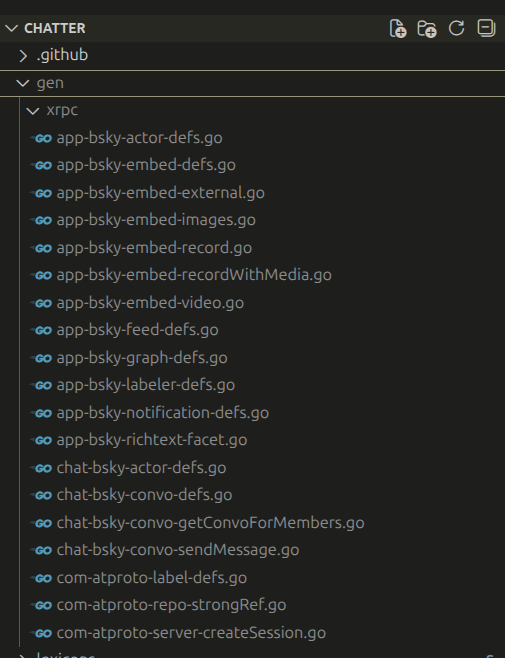
If you provide an optional manifest that lists XRPC methods, slink only generates the handlers and structs needed to call those methods.
{
  "ids": [
	"com.atproto.server.createSession",
	"chat.bsky.convo.getConvoForMembers",
	"chat.bsky.convo.sendMessage"
  ]
}
When we use this in the chatter project, slink generates these files:
slink leaves CBOR for infrastructure projects#
CBOR encoding is an important part of ATProto, but it’s not necessary for most ATProto applications, and so to keep those simple, it’s intentionally left out of slink. That doesn’t mean that it’s impossible to use CBOR with slink-generated data structures, it just moves all of the CBOR complexity outside of slink. CBOR code generators can use the json tags produced by slink, and dynamic CBOR generation is also possible by tripping through JSON, i.e converting struct to JSON, converting the JSON to generic Go types, and converting those to CBOR using a standard CBOR package like fxamacker/cbor. I have another project cooking that uses a custom CBOR generator for this and it’s been good enough to build a PDS with a working subscribeRepos feed.
slink generates a CLI#
You can use the slink CLI to explore AT Protocol methods and call them directly. Here’s a glimpse of what you’ll see running slink:
$ slink

"Perhaps we’ve shaken him off at last, the miserable slinker!"

A tool for working with the AT Protocol.

Environment Variables:
  SLINK_HOST sets the target host (e.g. "https://public.api.bsky.app").
  SLINK_AUTH sets the authorization header (e.g. "Bearer XXXX").
  SLINK_ATPROTOPROXY sets the atproto-proxy header.
  SLINK_PROXYSESSION sets the proxy-session header (used by IO).
  SLINK_USERDID sets the user-did header (used by IO).

Usage:
  slink [command]

Available Commands:
  call        Call XRPC methods
  check       Check XRPC records
  completion  Generate the autocompletion script for the specified shell
  generate    Generate slink code from a directory of Lexicon files
  help        Help about any command
  resolve     Resolve atproto identifiers
  token       Operate on tokens

Flags:
  -h, --help   help for slink

Use "slink [command] --help" for more information about a command.
$ slink call
Call XRPC methods

Usage:
  slink call [command]

Available Commands:
  app.bsky.actor            Call XRPC methods under app.bsky.actor
  app.bsky.ageassurance     Call XRPC methods under app.bsky.ageassurance
  app.bsky.bookmark         Call XRPC methods under app.bsky.bookmark
  app.bsky.contact          Call XRPC methods under app.bsky.contact
  app.bsky.draft            Call XRPC methods under app.bsky.draft
  app.bsky.feed             Call XRPC methods under app.bsky.feed
  app.bsky.graph            Call XRPC methods under app.bsky.graph
  app.bsky.labeler          Call XRPC methods under app.bsky.labeler
  app.bsky.notification     Call XRPC methods under app.bsky.notification
  app.bsky.unspecced        Call XRPC methods under app.bsky.unspecced
  app.bsky.video            Call XRPC methods under app.bsky.video
  at.noted.words            Call XRPC methods under at.noted.words
  chat.bsky.actor           Call XRPC methods under chat.bsky.actor
  chat.bsky.convo           Call XRPC methods under chat.bsky.convo
  chat.bsky.moderation      Call XRPC methods under chat.bsky.moderation
  com.atproto.admin         Call XRPC methods under com.atproto.admin
  com.atproto.identity      Call XRPC methods under com.atproto.identity
  com.atproto.label         Call XRPC methods under com.atproto.label
  com.atproto.lexicon       Call XRPC methods under com.atproto.lexicon
  com.atproto.moderation    Call XRPC methods under com.atproto.moderation
  com.atproto.repo          Call XRPC methods under com.atproto.repo
  com.atproto.server        Call XRPC methods under com.atproto.server
  com.atproto.sync          Call XRPC methods under com.atproto.sync
  com.atproto.temp          Call XRPC methods under com.atproto.temp
  tools.ozone.communication Call XRPC methods under tools.ozone.communication
  tools.ozone.hosting       Call XRPC methods under tools.ozone.hosting
  tools.ozone.moderation    Call XRPC methods under tools.ozone.moderation
  tools.ozone.safelink      Call XRPC methods under tools.ozone.safelink
  tools.ozone.server        Call XRPC methods under tools.ozone.server
  tools.ozone.set           Call XRPC methods under tools.ozone.set
  tools.ozone.setting       Call XRPC methods under tools.ozone.setting
  tools.ozone.signature     Call XRPC methods under tools.ozone.signature
  tools.ozone.team          Call XRPC methods under tools.ozone.team
  tools.ozone.verification  Call XRPC methods under tools.ozone.verification

Flags:
  -h, --help   help for call

Use "slink call [command] --help" for more information about a command.
$ slink call com.atproto.sync
Call XRPC methods under com.atproto.sync

Usage:
  slink call com.atproto.sync [command]

Available Commands:
  get-blob                 Get a blob associated with a given account. Returns the full blob as original...
  get-blocks               Get data blocks from a given repo, by CID. For example, intermediate MST node...
  get-checkout             DEPRECATED - please use com.atproto.sync.getRepo instead
  get-head                 DEPRECATED - please use com.atproto.sync.getLatestCommit instead
  get-host-status          Returns information about a specified upstream host, as consumed by the serve...
  get-latest-commit        Get the current commit CID & revision of the specified repo. Does not require...
  get-record               Get data blocks needed to prove the existence or non-existence of record in t...
  get-repo                 Download a repository export as CAR file. Optionally only a 'diff' since a pr...
  get-repo-status          Get the hosting status for a repository, on this server. Expected to be imple...
  list-blobs               List blob CIDs for an account, since some repo revision. Does not require aut...
  list-hosts               Enumerates upstream hosts (eg, PDS or relay instances) that this service cons...
  list-repos               Enumerates all the DID, rev, and commit CID for all repos hosted by this serv...
  list-repos-by-collection Enumerates all the DIDs which have records with the given collection NSID.
  notify-of-update         Notify a crawling service of a recent update, and that crawling should resume...
  request-crawl            Request a service to persistently crawl hosted repos. Expected use is new PDS...

Flags:
  -h, --help   help for com.atproto.sync

Use "slink call com.atproto.sync [command] --help" for more information about a command.
$ slink call com.atproto.sync list-blobs -h
List blob CIDs for an account, since some repo revision. Does not require auth; implemented by PDS.

Usage:
  slink call com.atproto.sync list-blobs [flags]

Flags:
      --cursor string   cursor
      --did string      did
  -h, --help            help for list-blobs
      --limit int       limit (default 500)
  -l, --log string      log level (debug, info, warn, error, fatal) (default "warn")
  -o, --output string   output destination
      --since string    since
The help information is all pulled from the Lexicon source.
The slink CLI has no file-based state#
Unlike other CLIs, slink stores and reads no authentication info in local files. Instead, everything is either read from direct code-level configuration or (for the CLI), from environment variables. This is for security: do what you want with your secrets, but slink will never put them in a file where they can leak.
The default slink client can call abstract sockets as well as TCP-based ones, and it is configurable with values that specify the host, the authorization header, the atproto-proxy header, and identity headers that an upstream proxy (ahem, IO) can use to add credentials to API calls that you send with slink.
  SLINK_HOST sets the target host (e.g. "https://public.api.bsky.app").
  SLINK_AUTH sets the authorization header (e.g. "Bearer XXXX").
  SLINK_ATPROTOPROXY sets the atproto-proxy header.
  SLINK_PROXYSESSION sets the proxy-session header (used by IO).
  SLINK_USERDID sets the user-did header (used by IO).
slink has a better representation of unions#
Here’s the slink implementation of the preferences union that we mentioned earlier. If you’ve worked with Protocol Buffer unions in Go generated code, it should look familiar:
// AppBskyActorDefs_Preferences_Elem is a union with these possible values:
// - AppBskyActorDefs_AdultContentPref (app.bsky.actor.defs#adultContentPref)
// - AppBskyActorDefs_ContentLabelPref (app.bsky.actor.defs#contentLabelPref)
// - AppBskyActorDefs_SavedFeedsPref (app.bsky.actor.defs#savedFeedsPref)
// - AppBskyActorDefs_SavedFeedsPrefV2 (app.bsky.actor.defs#savedFeedsPrefV2)
// - AppBskyActorDefs_PersonalDetailsPref (app.bsky.actor.defs#personalDetailsPref)
// - AppBskyActorDefs_DeclaredAgePref (app.bsky.actor.defs#declaredAgePref)
// - AppBskyActorDefs_FeedViewPref (app.bsky.actor.defs#feedViewPref)
// - AppBskyActorDefs_ThreadViewPref (app.bsky.actor.defs#threadViewPref)
// - AppBskyActorDefs_InterestsPref (app.bsky.actor.defs#interestsPref)
// - AppBskyActorDefs_MutedWordsPref (app.bsky.actor.defs#mutedWordsPref)
// - AppBskyActorDefs_HiddenPostsPref (app.bsky.actor.defs#hiddenPostsPref)
// - AppBskyActorDefs_BskyAppStatePref (app.bsky.actor.defs#bskyAppStatePref)
// - AppBskyActorDefs_LabelersPref (app.bsky.actor.defs#labelersPref)
// - AppBskyActorDefs_PostInteractionSettingsPref (app.bsky.actor.defs#postInteractionSettingsPref)
// - AppBskyActorDefs_VerificationPrefs (app.bsky.actor.defs#verificationPrefs)
// - AppBskyActorDefs_LiveEventPreferences (app.bsky.actor.defs#liveEventPreferences)
type AppBskyActorDefs_Preferences_Elem struct {
	Wrapper AppBskyActorDefs_Preferences_Elem_Wrapper
}

// Value wrappers must conform to AppBskyActorDefs_Preferences_Elem_Wrapper
type AppBskyActorDefs_Preferences_Elem_Wrapper interface {
	isAppBskyActorDefs_Preferences_Elem()
}
Here we say that the preference element can have exactly one value, a type that implements the (type)_Wrapper interface. Wrapper types are generated for each possible union type. Here’s one:
// AppBskyActorDefs_Preferences_Elem__AppBskyActorDefs_MutedWordsPref wraps values of type *AppBskyActorDefs_MutedWordsPref
type AppBskyActorDefs_Preferences_Elem__AppBskyActorDefs_MutedWordsPref struct {
	Value *AppBskyActorDefs_MutedWordsPref
}

func (t AppBskyActorDefs_Preferences_Elem__AppBskyActorDefs_MutedWordsPref) isAppBskyActorDefs_Preferences_Elem() {
Here’s how we set that enum in code:
elem := &xrpc.AppBskyActorDefs_Preferences_Elem{
	Wrapper: xrpc.AppBskyActorDefs_Preferences_Elem__AppBskyActorDefs_MutedWordsPref{
		Value: &xrpc.AppBskyActorDefs_MutedWordsPref{
			Items: []*xrpc.AppBskyActorDefs_MutedWord{
				{Value: "atproto"},
				{Value: "bluesky"},
				{Value: "lexicon"},
			},
		},
	},
}
It’s obviously not concise! But it’s surprisingly easy to write this code in an autocompleting text editor, and it’s completely unambiguous. The union can only be set to one value and it’s easy to read with a type switch (not shown).
How it works: let’s send a chat message#
Use the slink CLI to explore the Bluesky Chat API#
I’ll show you this with a shell script. Pull it apart to see how you can use slink to call
#!/bin/sh
# The sender, receiver, and sender's password are required arguments.
SENDER=$1
RECEIVER=$2
PASSWORD=$3

# First we get the sender's PDS.
export SLINK_HOST=$(slink resolve did $(slink resolve handle $SENDER) --pds)

# Then we call com.atproto.server.createSessionn to get an auth token.
export SLINK_AUTH="Bearer $(slink call com.atproto.server create-session \
		--identifier $SENDER \
		--password $PASSWORD \
		| jq .accessJwt -r)"

# chat.bsky.convo.getConvoForMembers creates a chat "conversation".
export CONVOID=$(SLINK_ATPROTOPROXY=did:web:api.bsky.chat#bsky_chat \
	slink call chat.bsky.convo get-convo-for-members \
	--members $(slink resolve handle $SENDER) \
	--members $(slink resolve handle $RECEIVER) \
	| jq .convo.id -r)

# Use chat.bsky.convo.sendMessage to send a message.
SLINK_ATPROTOPROXY=did:web:api.bsky.chat#bsky_chat \
	slink call chat.bsky.convo send-message \
	--convo-id $CONVOID \
	--message message.json
Here’s message.json:
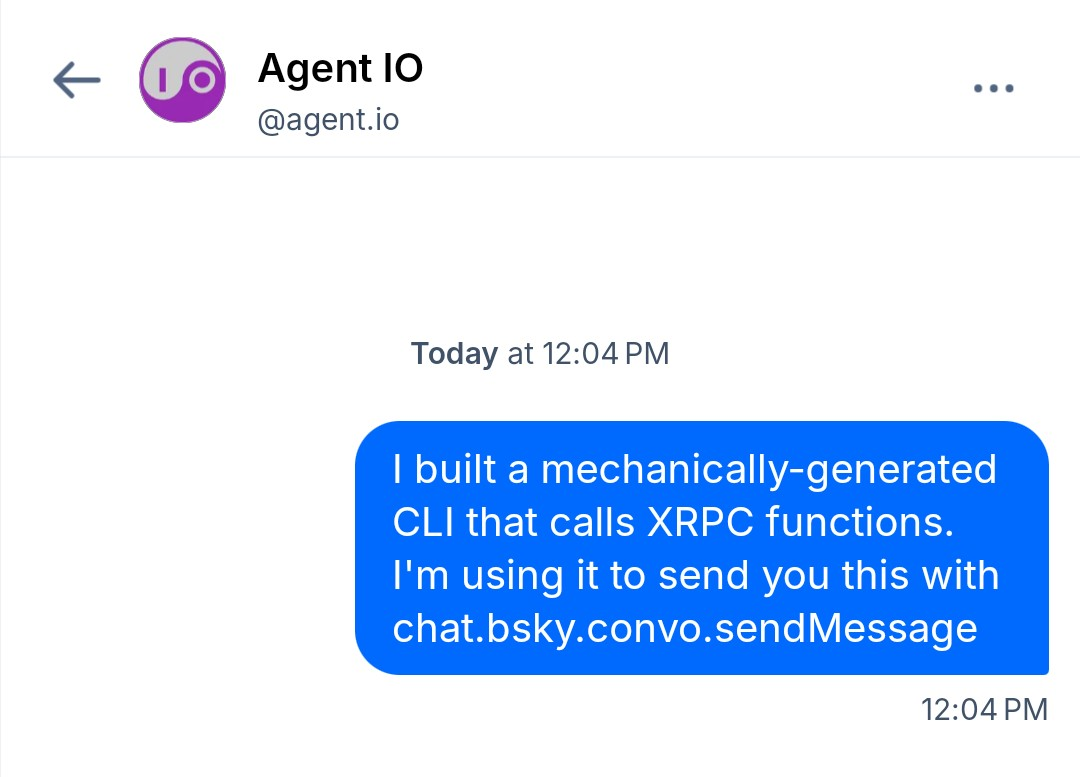
{"text": "I built a mechanically-generated CLI that calls XRPC functions. I'm using it to send you this with chat.bsky.convo.sendMessage"}
And here’s what I get when I run the script:
{
  "id": "3mgnkdgy6yk2g",
  "rev": "2222224ej6uph",
  "sender": {
    "did": "did:plc:ahr5yhciwadehhwm7fotyfju"
  },
  "sentAt": "2026-03-09T19:04:34.434Z",
  "text": "I built a mechanically-generated CLI that calls XRPC functions. I'm using it to send you this with chat.bsky.convo.sendMessage"
}
Use a slink-generated client library in a Go program#
The agentio/chatter repo does this directly from Go using a slink-generated client library. I’ll let you read the code – it’s the best explanation of the way this all fits together. The Makefile and Go action configuration show how slink is used to generate the client library.
Recommended Practices#
I’ve built several projects now with slink and in the process, I’ve come up with some recommendations for how to best use slink.
Import lexicons as a Git module#
Include a Lexicons repo as a Git module. To make these imports lightweight, I’ve set up a separate repo that just contains lexicons. It will need to be updated as the upstream sources change, so be careful with this, and you might prefer to create your own lexicons repos that contain extra lexicons that you want to use, and of course you could directly check lexicon sources into your project repos.
Use a manifest#
Write a manifest and use it to generate your client. I generally call my manifests xrpc.json and I keep them in the root directory of my projects.
Generate your client libraries at build time#
Generally I don’t check client libraries into my repos. This has one downside: go install is unable to build binaries in these repos because it can’t generate code (without //go:generate build directives, possibly a subject of a future update to this post).
Don’t mix client libraries from different sources#
Finally, never ever (ever) do this! It’s a recipe for a dependency nightmare, because those client libraries will have dependencies that will often be out of sync. Only use client libraries that you generate yourself, and for XRPC, you can generate them all with slink.
Conclusion: use slink and tell me about it!#
As a Go developer, I’ve really enjoyed my liberation from indigo-saddled development. My projects are lighter, build faster, and I find that everything about them is easier to understand.
I think this might be true for you, too, and I would appreciate hearing feedback from anyone who tries slink.
Also, I’m actively tweaking slink as I use it in my projects and will feel more or less free to make breaking changes depending on who’s affected. So please do let me know if you depend on it!